
Motion control
BC1061 motion control:
turn, reach and reset
Turn toward a marker, lower the arm and reset. Explore BC1061 handheld motion and joystick operation, see which controls the supplier clips show, and prepare a simple excavator demonstration.
See the actionsReal actions
Explore every filmed move
Movement, controls and details from the supplier demonstrations. Each clip names the filmed color and matching configuration; the scene and play missions below are illustrations and suggestions.
BC1061
5 demonstrations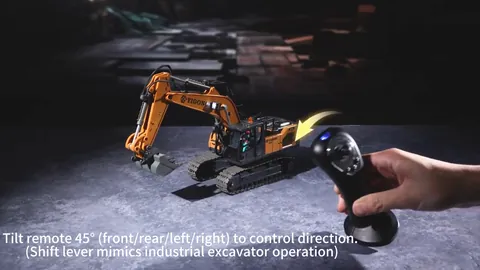
Supplier demonstration · BC1061
Supplier demonstration · BC1061
Supplier demonstration · BC1061
Supplier demonstration · BC1061
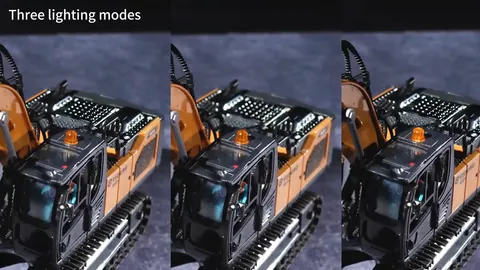
Supplier demonstration · BC1061
Silent clips load when you press play. A repeated excerpt shows a visible action, rather than a measurement of speed, slope, capacity or operating time.
Turn, reach and reset
Begin on a clear, level area suitable for the excavator. Put a flat visual marker beside the vehicle and leave the arm and bucket room to move. Use the supplied manual to identify the controls and select the controller mode before starting.
- Find the turn. In the motion-control demonstration, the player tilts the hand-held controller while the excavator turns. Practise a small movement, stop, and look at the new direction.
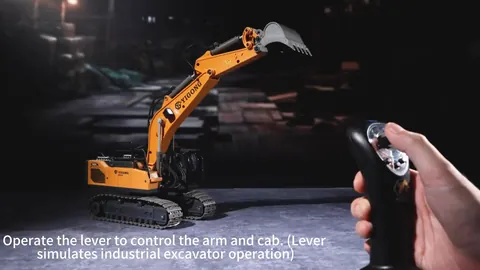
- Add the reach. The joystick clip shows the arm lowering. Use the instructions for that mode to guide the bucket toward your marker, with the area around the arm kept clear.
- Make a sequence. Turn toward the marker, lower the arm, and reset. Say each action aloud or draw three simple action cards to remember the order.
Change one part of the sequence each time: the marker position, the direction of the turn, or the order of the actions. The shared mission is a play idea, rather than a filmed accuracy or lifting test.
BC1061 motion and joystick control explained
BC1061 is listed as Motion + joystick: both control modes belong to the same catalog configuration, with one remote controller in its package list. The motion controller is held in the hand. It is different from the wrist-worn gesture watch included with TCS17 and TCS40 DUAL cars.
Swipe or scroll to compare all columns.
| Control or detail | What the supplier footage shows | What to check before a demo |
|---|---|---|
| Hand-held motion mode | A player tilts the controller as the excavator turns. | Identify the operating mode and hold position in the manual. Practise a short turn and stop on a clear surface. |
| Joystick operation | Joystick movement is shown alongside the arm lowering. | Use the manual to identify the arm controls and leave space around the arm and bucket. |
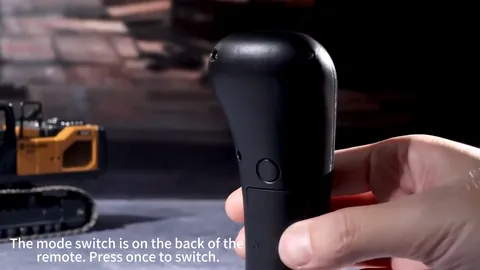
| Controller mode button | A close-up shows a button on the back of the controller. | Confirm mode selection and pairing from the supplied instructions; the close-up alone does not establish the button sequence. |
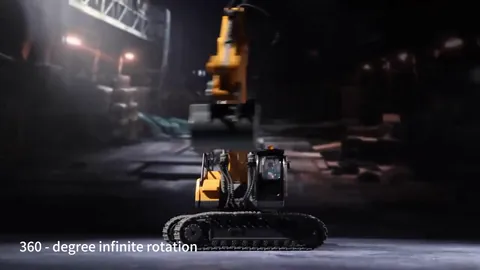
| Vehicle functions | Separate excerpts show upper-body movement and lighting modes. | Check each function separately. An edit between scenes does not establish which control caused every movement. |
The catalog also lists a working digging arm, alloy bucket, lights, construction sounds and automatic demonstration. A listed feature and a visible clip serve different purposes: neither gives a measured response time, lifting capacity or a complete operating procedure.
Check the controller with the sample
- Confirm BC1061 on the order. Match the controller and the Motion + joystick configuration to the product page and package contents.
- Prepare using the instructions. Check the battery label, charging instructions, pairing and mode selection before starting. The catalog package lists a rechargeable vehicle battery, USB cable, screwdriver and manual alongside the vehicle and remote.
- Observe one mode at a time. Try the short turn-and-reach mission above, using the manual to select the mode. Record which action you checked and which controller input you used.
- Review the intended demonstration. Confirm space, operating materials and instructions before using the sample in a retail display. Keep any actual sample observations separate from the supplier footage shown here.
This is a suggested sample checklist. No MaxTrek performance test or controller calibration procedure is claimed on this page.
Choose by the control or the worksite task
Choose BC1061 when you want to explain hand-held motion and joystick operation. If attachment choice matters more, compare YLJ01's bucket, drill and grapple options in the excavator and dump-truck guide; that page also lists the base battery and packaging information for BC1061, YLJ01 and YLJ02.
If the requirement is a wrist-worn gesture watch for a stunt car, use the TCS17/TCS40 SINGLE and DUAL comparison. A watch bundle and BC1061's hand-held motion control are distinct selections, not interchangeable descriptions.
A few useful distinctions
Is this a gesture-watch toy?
No. The filmed BC1061 controller is held in the hand. The catalog configuration is Motion + joystick.
Can it join a mini worksite?
It can be part of a proposed worksite story with a loading and delivery point. Use the model instructions to choose suitable material and operating conditions; this guide does not state a lifting capacity.
Sources: supplier product footage and BC1061 model and controller information. Reviewed . Play ideas are suggestions; follow the supplied manual.